

AI Innovation: Data Strategy

AI Innovation: Building a Robust Data Strategy
Artificial intelligence is a now a significant aspect of the modern business world. After all, with so many new innovations and ways to empower your business, AI’s benefits cannot be understated.
When combined with the other most important part of your business, your data strategy, AI can be one of the key technologies in helping your business prosper. Especially with new tools such as Microsoft Fabric, there are now more ways than ever to take advantage of AI’s data capabilities.
In this blog, we will go over everything you need to know about building a robust strategy. We’ll tell you why it’s important to have one and how you can easily leverage Microsoft Fabric to supercharge your business.
Importance of a Robust Data Strategy
Data is at the heart of your business, and is the information that flows through every decision that you make and every step that you take. Making sure that you have a robust data strategy will ensure that you can easily leverage the power of data to make the best decisions possible.
Here are a few ways that having a data strategy can be such a valuable asset:
- Informing your decision making: A strong data strategy will ensure that all of the information and data that you have can be used easily to make decisions based on evidence and grounded in data.
- Efficiency: A data strategy will streamline your data management process and minimise any errors and low-quality areas throughout your data handling process.
- Compliance: With so many compliance regulations becoming commonplace, a data strategy will ensure that all data is handled correctly, which will ensure that you don’t end up falling in breach of compliance.
By investing in your data strategy, you ensure that all of the data that you are using is optimised, handled correctly, and easy to use within your decision-making process.
Key Components of a Data Strategy
Data Management
Data management is the core of any good data strategy, as it refers to the wider way in which you manage your data and ensure that it is accurate, available, secure, and usable.
By ensuring that you have strict data management rules and robust processes, you can keep your data in a state that makes it both easy to use and organised enough for easy indexing, governance, and integration across the board.
Without having a robust data management system in place, you cannot even begin to look at other aspects of your data strategy, data management is the core of everything, and it’ll define your whole strategy.
Data Integration
Data integration is the process of bringing together data from different sources into one unified place, enabling your whole organisation to consistently access all of your data.
This helps with analytics, reporting, and getting a wider picture of your organisation’s data to make decisions, as one piece of data won’t be enough to make well-thought-out decisions and observations.
Failing to consider data integration will mean that you’ll fail to meet your full potential, making your data much less valuable than it could’ve been. By bringing your data together, you can connect the dots and make much more valuable observations, letting you innovate and take a step into the future, and ahead of your competition.
Data Governance
Data governance is the act of managing data regarding security and responsibility. It essentially ensures that data meets all security requirements and regulatory rules to ensure the sanctity and integrity of your data.
This is vital, as governance means that you can rest assured that the data you’re using is both safe and secure. Part of this is accountability, and making sure that everyone within your organisation has clear roles and responsibilities, democratising the role of data management throughout your company.
In the modern world, governance has become hugely important. Failing to focus on governance will lead to a host of security, compliance, and integrity issues and will ultimately compromise your data and your business altogether.
Leveraging Microsoft Fabric for Data and AI Innovation
Being one of the leaders in AI in the modern world, Microsoft has taken AI-based data strategisation to the next level. Microsoft Fabric is a Software as a Service (SaaS) based data platform that is designed to help revolutionise your data strategy by bringing all components of it together, powered by OneLake.
OneLake is a centralised data lakehouse, which allows you to bring data from anywhere within your organisation together with ease. Instead of having to utilise data silos, Fabric and OneLake ensure that your data is consistent across all tools and even supports both structured and unstructured data in tandem.
With this, you can take advantage of the many AI features that supercharge your data and its power, from machine learning through Microsoft Azure, to Power BI, creating democratised analytics. By using Fabric, you can utilise your data throughout the Microsoft data intelligence ecosystem, taking advantage of the powerful tools that Microsoft has developed to help businesses take control of their data.
Finally, Fabric is scalable, much like the Azure ecosystem that it’s built upon. This means it’s adaptable to your needs and can support massive data workloads if necessary, allowing you to reach your full potential without having to worry if your infrastructure can support it. Microsoft has built their platform with scaling in mind, and will accommodate your growth to its highest limit.
How We Can Help
Microsoft Fabric is an essential component of any organisation’s data strategy, and allows you to take advantage of a data ecosystem that pushes your business’s data potential to the next level. By utilising your data effectively, you can make better decisions and break barriers that’ve never been broken before.
If you’re looking to get started with Fabric and Azure and need a helping hand, reach out to us today. We’re here to help and to ensure you have everything you need to succeed with your data strategy.
Get in touch with us now and see how we can help.
Get in touch:
01952 972 401
help@stiper.co.uk

Protecting Your Data After Attack
How to Protect Yourself and Your Data After a Cyber Attack
In the wake of the recent UK Legal Aid Agency data breach, many individuals are understandably concerned about the safety of their personal information. Whether or not you were directly affected, this incident is a stark reminder of how vulnerable our data can be—and how important it is to know what to do if your information is compromised.
What Is a Data Breach?
According to the UK’s National Cyber Security Centre (NCSC), a data breach occurs when information is accessed or disclosed without authorisation. This can happen through hacking, accidental leaks, or even the loss of physical devices like laptops or USB drives. The consequences can range from mild inconvenience to serious identity theft or financial loss.
First Steps After a Breach
If you suspect your data has been compromised, here’s what you should do immediately:
- Stay Informed: Follow updates from the organisation involved. They are legally required to inform you if your data has been affected.
- Change Your Passwords: Especially for any accounts that use the same login details as the breached service.
- Use Phish-Resistant Authentication: Instead of traditional two-factor authentication (2FA) methods like time-based authenticator codes, consider switching to U2F (Universal 2nd Factor) security keys. These physical devices offer strong protection against phishing attacks and are supported by major platforms like Google, Microsoft, and Facebook.
- Monitor Your Accounts: Keep an eye on your bank statements, credit reports, and online accounts for any unusual activity.
- Keep Your Devices Up to Date: Ensure your computer, smartphone, and other devices have the latest security updates and patches installed. This helps protect against vulnerabilities that hackers may exploit.
Know Your Rights
If your personal data has been lost or stolen, you have rights under UK data protection law:
- You can ask the organisation what data was affected.
- You can request that they take steps to mitigate the damage.
- You may be entitled to compensation if the breach causes you harm.
If you’re not satisfied with the organisation’s response, you can escalate the issue to the Information Commissioner’s Office (ICO).
Watch Out for Scams
After a breach, scammers often take advantage of the situation. The NCSC warns that phishing emails, texts, and calls may follow, pretending to be from the breached organisation or other trusted sources.
How to Spot a Scam:
- Urgency: Scammers often pressure you to act quickly.
- Too Good to Be True: Offers or prizes that seem suspiciously generous.
- Spelling and Grammar Errors: Many scams contain obvious mistakes.
- Unusual Sender Addresses: Check the email address carefully.
- Requests for Personal Information: Legitimate organisations will never ask for sensitive data via email or text.
If you receive a suspicious message, don’t click any links or download attachments. Instead, report it.
How to Report a Scam
- Text Scams: Forward to 7726 (free of charge)
- Phone Scams: Report to Action Fraud at actionfraud.police.uk or call 0300 123 2040
Stay Proactive with Stiperstone
At Stiperstone, we understand how stressful and confusing a data breach can be. That’s why we offer:
- Proactive Cybersecurity Advice: Learn how to prevent breaches before they happen.
- Incident Response Support: Call us immediately if you suspect a breach—we’re here to help.
- Forensic Investigation Services: We can trace the source of the breach and help you understand what happened
- Think you’ve experienced a breach?: Download our free Forensic Response Checklist produced by our forensic experts — register with your email to access the full resource.
Don’t wait until it’s too late.
Register your details below to get a FREE checklist sent to your inbox:
Cyber Crime in Shropshire
Cyber Crime in Shropshire: Why Ransomware-as-a-Service Is Everyone’s Problem
In the quiet lanes of Shropshire, where rolling hills meet historic market towns, it’s easy to believe that cyber crime is a problem for someone else—big cities, global corporations, or government agencies. But this belief is not only outdated—it’s dangerous.
The Rise of Ransomware-as-a-Service (RaaS)
Cyber crime has evolved. No longer the domain of lone hackers in dark basements, today’s threats are orchestrated by sophisticated criminal syndicates offering Ransomware-as-a-Service (RaaS)—a business model where malware developers lease their tools to affiliates who carry out attacks. This model has made ransomware more accessible, scalable, and devastating than ever before.
According to the Royal United Services Institute, ransomware has become the most disruptive cyber threat to the UK’s national security, with average ransom payments reaching £1.6 million in 2023.
These attacks don’t just target large corporations—they’re increasingly aimed at smaller organisations, local councils, and critical infrastructure.
“Everyone Is a Target” – Graeme Pearson
Graeme Pearson, former head of the Scottish Crime and Drug Enforcement Agency, warns that “the myth of immunity is the greatest vulnerability.” He explains:
“Cyber criminals don’t care about your postcode. They care about your data, your systems, and your ability to pay. Rural businesses and public services are just as vulnerable—if not more so—because they often lack the defences of larger organisations.”
This is especially true in counties like Shropshire, where many businesses and organisations operate under the assumption that their rural location shields them from digital threats. It doesn’t.
The Local Impact: Shropshire Is Not Immune
From agricultural firms and logistics companies to schools and local councils, Shropshire’s infrastructure is increasingly digital—and therefore increasingly at risk. A successful ransomware attack could halt operations, compromise sensitive data, and erode public trust.
The 2020 ransomware attack on Redcar and Cleveland Borough Council is a chilling example. It took eight and a half months to recover, during which time social services, email systems, and even phone lines were down.
Imagine the impact of a similar attack on a Shropshire council or healthcare provider.
Small Businesses: The Existential Risk
Tash Buckley, a cyber security expert at Cranfield University, highlights the disproportionate risk faced by smaller firms:
“It really can happen to anyone. For larger companies, you’ve got the resources to bring in experts. But for smaller firms, it’s an existential issue. They don’t have the kind of finances that big corporations do to recover from a major attack.”
She also warns of the growing threat posed by RaaS, which combines data theft with system encryption—a double blow that increases the pressure to pay and the damage done.
Cyber Security Is Not Optional—It’s Foundational
For many organisations, cyber security still feels like a “nice-to-have” rather than a necessity. But the cost of inaction is far greater than the cost of prevention. A single breach can destroy years of trust, disrupt services, and lead to financial ruin.
Cyber security is not just an IT issue—it’s a leadership issue. Boards and senior managers must understand that protecting digital assets is as critical as safeguarding physical ones.
A Call to Action for Shropshire
At Stiperstone, we believe that every organisation—no matter its size or location—deserves state-of-the-art protection. We’re calling on local businesses, charities, councils, and service providers to take action now.
Let us help you assess your systems, policies, and procedures. We’ll work with you to identify vulnerabilities, implement best practices, and build a cyber resilience strategy that fits your needs and budget.
Don’t wait for a breach to realise the importance of cyber security. Contact Stiperstone today and take the first step toward protecting your organisation in this new era of cyber crime.
Get in touch:

Scattered Spider Attacks

Understanding and Mitigating Scattered Spider Attacks on Retail Giants

In the last few weeks, the UK retail sector has suffered a series of cyber attacks targeting prominent retailers Marks & Spencer, the Co-op, and Harrods. These attacks, attributed to the hacking group known as Scattered Spider, have caused significant disruptions and financial losses. We aim to provide our clients and prospective clients with a comprehensive understanding of these incidents and in addition offer proactive hardening recommendations to help safeguard against similar threats.
Who or what is Scattered Spider?
Scattered Spider is a loosely affiliated and adaptive hacking group, mostly composed of English-speaking teenagers and young adults based in the UK and US. Operating like an organised criminal network, they have been linked to over 100 cyber-attacks across various sectors, including telecoms, finance, retail, and gaming, since their emergence in 2022. Their favoured method of attacking victims involves exploiting human vulnerabilities through social engineering tactics rather than technical system flaws to gain a foothold, then exploiting internal, technical vulnerabilities.
The recent attacks on these three companies, amongst others, have highlighted the group’s capabilities and the severe impact they can have on retail operations. Marks & Spencer experienced significant disruptions, including the suspension of online orders and job listings, shortages in stores, and a substantial loss in market value. Harrods, while continuing operations, has faced challenges in ensuring the security of customer data. The Co-op has also been affected and whilst details of their specific disruptions remain unclear, it is plain to see that their stock levels on a shop-by-shop basis are suffering.
Proactive Hardening Recommendations
Considering these attacks, it is crucial for businesses to adopt or continue proactive measures to enhance their cyber security posture. Based on recent guidance from Google’s security teams, here are some key recommendations to help mitigate the risk of similar incidents:
Identity Management
- Implement phishing-resistant authentication methods such as hardware security keys or software passkeys. These methods provide stronger protection against phishing attacks compared to traditional multi-factor authentication
- Transition to passwordless authentication where possible, again to provide a stronger defence against a phishing attack
- Ensure that users have the minimum level of access necessary to perform their job functions. Regularly review and adjust access permissions to reduce the risk of misuse
- Remove SMS, phone call and email as primary authentication controls due to their vulnerability to phishing
- Enforce positive identity verification for help desk requests, including on-camera/in-person verification, ID verification, challenge/response questions, and out-of-band verification
- Restrict MFA registration and modification to trusted IP locations and compliant devices
- Monitor and alert on MFA registration events and suspicious activities, such as the same MFA device/phone number associated with multiple users
- Enforce multi-context criteria (like device and location attributes) as part of authentication transactions
- Avoid reliance on publicly available personal data for identity verification, as attackers may possess this information
Endpoint Security
- Deploy Endpoint Detection & Response (EDR) solutions to continuously monitor and analyse endpoint activities for signs of compromise. EDR tools can help detect and respond to threats in real-time
- Ensure all software and systems are up-to-date with the latest security patches. Regular updates help close vulnerabilities that attackers might exploit
Application and Resource Protection
- Implement secure configurations for all applications and resources. Regularly review and update configurations to adhere to best practices and reduce exposure to threats
- Use application whitelisting to allow only approved applications to run on your systems. This can prevent the execution of malicious software
Network Infrastructure
- Segment your network to limit the spread of an attack. By isolating critical systems and data,the potential impact of a breach can be reduced and make it more challenging for attackers to move laterally within your network
- Adopt a Zero Trust approach to network security, where no entity, individual or system, is trusted by default. Continuously verify and authenticate all users and devices attempting to access network resources
Monitoring and Detection
-
- Implement advanced threat detection and response solutions to continuously monitor network activity for signs of compromise. Establish an incident response plan to quickly address and mitigate any detected threats
- Use behavioural analytics to identify unusual patterns of activity that may indicate a security incident. This can help detect threats that traditional signature-based methods might miss
Conclusion
These recent attacks serve as a reminder of the evolving threat landscape. By implementing the proactive hardening recommendations outlined above, businesses can significantly enhance their defences against sophisticated cyber threats. As a cybersecurity company, we are committed to supporting our clients in building robust security frameworks to protect their operations, customer data and revenue streams.
Ready to Get Started?
For more detailed guidance and support, please contact our team of experts who are ready to assist you in fortifying your cyber security posture. Whether you need help with implementing phishing-resistant login protection, deploying endpoint detection and response solutions, or adopting a Zero Trust architecture, we are here to provide tailored solutions to meet your specific needs.
Reach out to us today to ensure your business is protected against the latest cyber threats.
Get in touch:
Unlock Efficiency with Microsoft 365
Unlock Efficiency: 6 Under-used Features in Microsoft 365
Microsoft 365 is the cornerstone of the modern workplace. We all know and love applications like Outlook, Word, Excel, PowerPoint, and the rest of the classic Office apps that make the work day far easier. But, Microsoft 365 has a lot of other features that will help you take your workplace to the next level.
Some of these tools will help you become more productive and efficient within the workday, while others will unlock new features that let you complete things that were never before possible with cutting-edge and innovative tools.
In this article, we’re going to go over the six most underutilised tools within the Microsoft 365 application suite that you can get started with today, to help your business truly prosper.
Power Automate
Automation is a key modern technology. The power of being able to repeat a task that would otherwise take minutes in seconds is already strong, but being able to do so endlessly and automatically will let you complete so much more with a fraction of the effort.
Power Automate is Microsoft’s powerful automation tool. It takes the power of automation to the next level, letting you fully optimise your business while giving you the tools to discover your organisation’s potential automation options and opportunities.
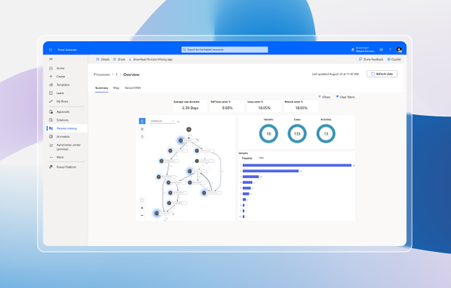
Fully powered by AI, Power Automate lets you use natural language with Copilot, letting you find new solutions and create new automation workflows easily. Power Automate also gives you AI insights to tell you where you can further optimise your business and find new ways to let automation take your business to its full potential.
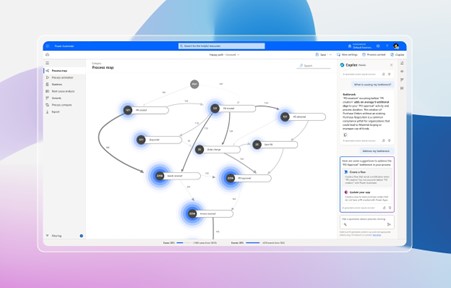
For example, Power Automate can be used to turn simple tasks such as categorising emails and managing employee requests into automatic tasks, letting you save valuable minutes throughout the day. It also works with the entire suite of Microsoft 365 products and even other products outside of the Microsoft Ecosystem.
Quick Parts
Quick Parts is a feature in Word and Outlook that lets you save phrases that you might need to access regularly, letting you have quick access to common phrases and content that would otherwise take up time to type that you’d have to type regularly.
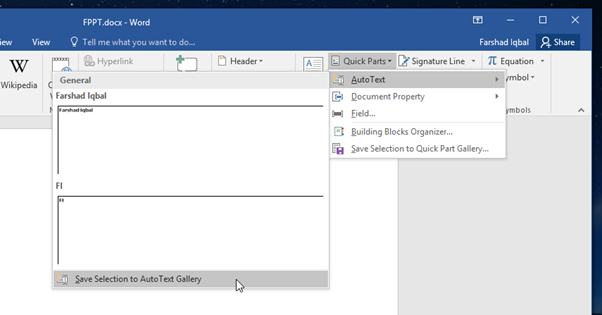
There are a few different tools within Quick Parts that serve different purposes:
- AutoText: AutoText lets you store content to reuse over and over again.
- Document Property: Document Property lets you enter a pre-defined variable, such as a company address.
- Field: Field lets you insert fields that can provide automatically updated information.
- Building Blocks Organiser: Building Blocks Organiser lets you preview and manage your Quick Parts building blocks.
Microsoft Planner
Microsoft Planner is Microsoft’s new planning application within Microsoft 365. Fully integrated into Microsoft 365’s collaborative tools such as Teams and Outlook, you can use Microsoft Planner to both manage personal time and also organise your meetings and events across your organisation.
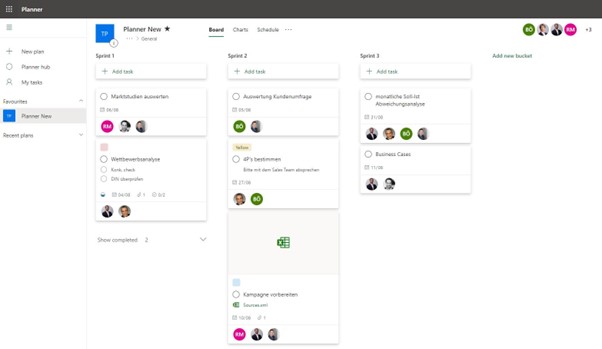
Using Microsoft Planner, you can easily visualise your time during the week and easily create plans for tasks and sprints for your teams, meaning that you can fully organise teams and ensure that everyone is assigned to do what they need to do when they’re supposed to do it — without confusion.
Viva Insights
Microsoft Viva Insights is part of the Microsoft Viva suite of tools and exists to help you improve your business’s success with actionable insights and create objectives for you to achieve.
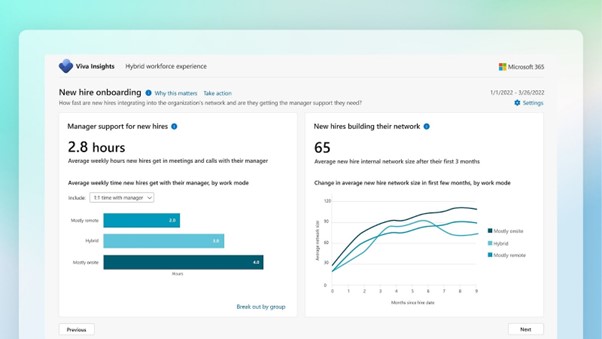
Viva Insights is built around helping your organisation prosper, by using information to create actionable and innovative insights to ensure that your business has all the information that it needs to hit the ground running.
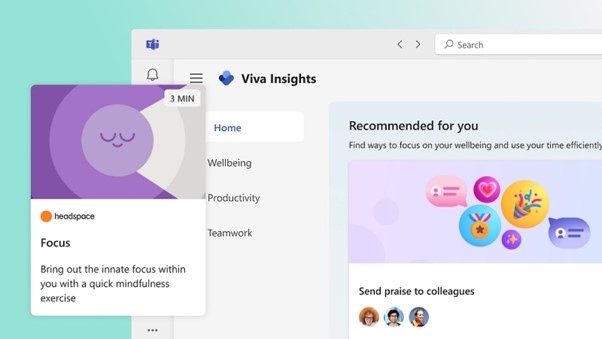
As well as your workplace, Viva Insights also helps you build better work habits and look after your own personal well-being, by using insights and data to make sure that you’re not overworking or pushing yourself to the limit. This will help all of your employees be more mindful of their own health, and raise morale throughout your organisation.
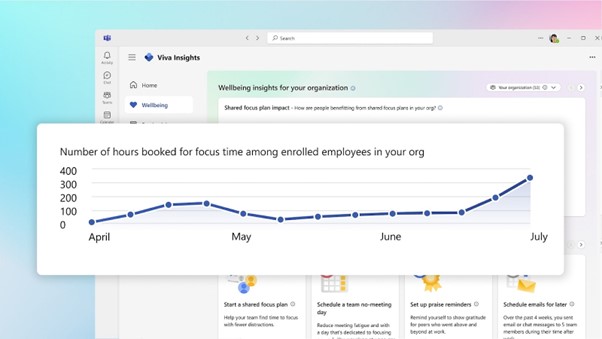
Viva Insights can be used to track data and trends after a business change, which makes it one of the best tools to have at hand when you’re implementing new technologies into your organisation.
Microsoft Intune
Microsoft Intune is an essential tool for BYOD and hybrid working. It manages identities, apps, and devices, and lets you ensure that your business is safe and protected from any breaches that could happen due to the implementation of hybrid working structures.
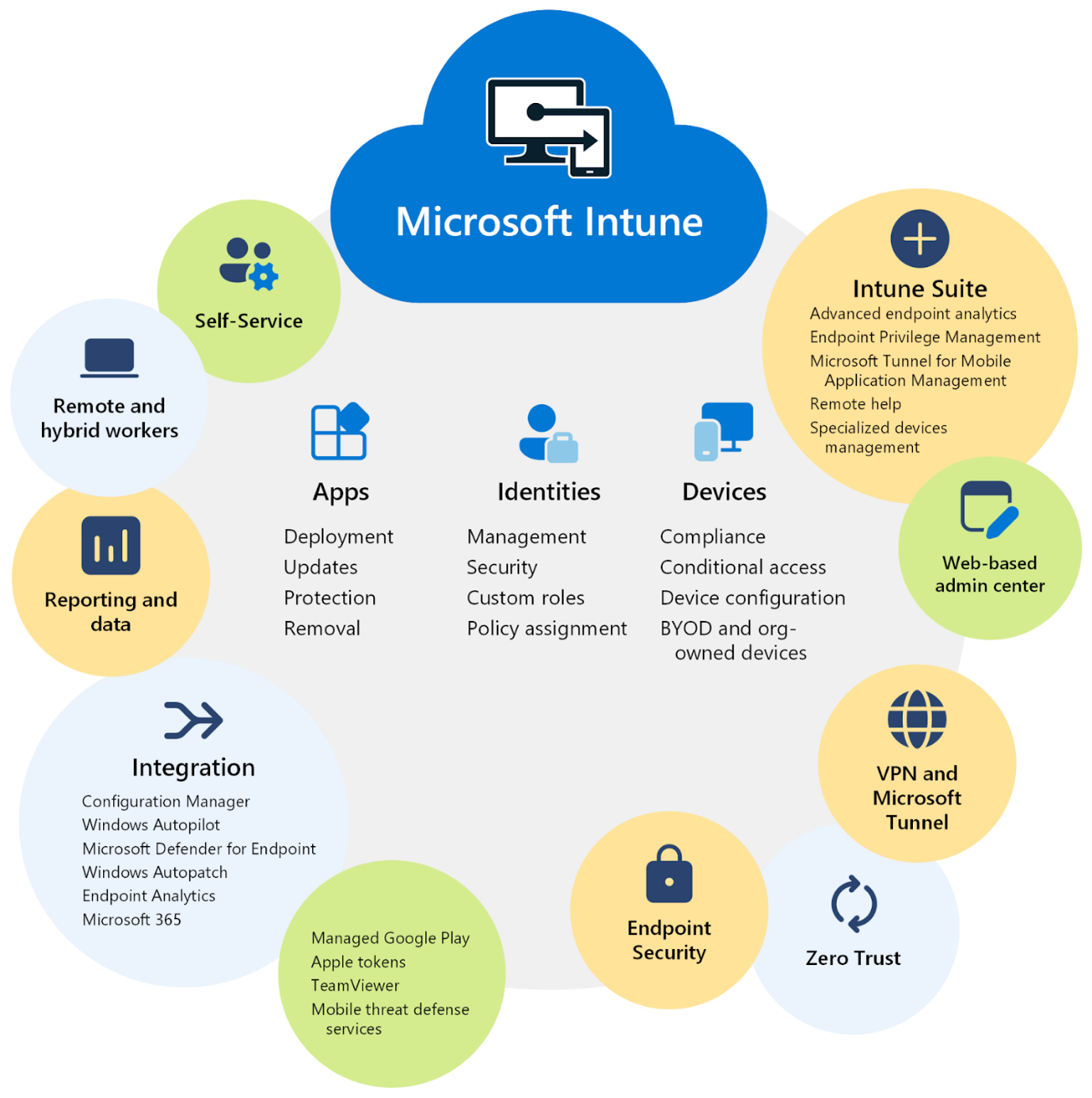
As a cloud-based endpoint management solution, Intune lets you have full control over your organisation’s access and data, implementing and following security models such as the Zero Trust security model to ensure that your organisation is secure.
Using Intune, you can also automate the process of policy deployment, making it easier than ever to ensure that all policies are in place to protect your business.
Entra ID
Formerly Azure Active Directory, Microsoft Entra ID is a powerful security tool that is essential for any organisation.
With tools such as Multi-Factor Authentication, Single Sign-On and Conditional Access being a part of Entra ID’s arsenal, there are so many security options that come as part of Entra ID that are essential for a modern business.
Entra ID also helps protect identity based-risks as well as having options for privileged identity management, meaning that you’re always in control of your organisation’s access permissions and can ensure only those who need access have it.
How We Can Help
Microsoft 365 is packed with essential tools that can help you take your organisation to the next level. While there are obvious applications like Outlook and Excel that are everyday haymakers, these six applications are commonly overlooked while being essential for the modern workplace.
If you’re looking for a helping hand to guide you through your Microsoft 365 journey, look no further. Our experts are here to help you the whole way and will ensure that you have everything you need to get the most out of Microsoft 365.
Get in touch with us now and see how we can help you.
Get in touch:

A Deep Dive into Microsoft 365
Exploring the All-in-One Solution: A Deep Dive into Microsoft 365
Few brands have the respect and merit that Microsoft 365 has in the modern business world. With 65% of companies worldwide already utilising it within their organisation, Microsoft’s productivity and collaboration suite is unparalleled when it comes to its popularity.
From the outside, it can be difficult to see the unique features, tools, and advantages that come with Microsoft 365. However, its popularity speaks for itself — businesses love it, and it seems as though there’s no sign of its popularity slowing down.
In this article, we’re going to do a deep dive into Microsoft 365, to show exactly why so many organisations gravitate towards using it. We’ll look at the tools, features, and benefits that all come with utilising Microsoft 365.
Microsoft 365: An Overview
Microsoft 365 — formerly known as Microsoft Office 365 — is a suite of applications and tools that are the essentials for your workplace’s productivity.
Classic applications like Word, Excel, and PowerPoint are incredibly popular worldwide; and Microsoft 365 is the suite that lets you utilise them within your business. With regular upgrades, updates, and patches, Microsoft 365 makes it easier than ever to have constant access to the best Microsoft experience throughout your organisation.
Microsoft 365 also comes with a whole host of other tools that are useful for a modern business — from collaborative and communicative tools such as Outlook and Teams to cyber security services like Defender, Microsoft 365 is a must-have all-in-one package for any business.
Plus, Microsoft 365 is fully cloud-enabled using OneDrive, meaning that you can easily take advantage of the benefits of the cloud by being able to access and share your files and work anywhere.
Key Features and Tools
Productivity
The productivity tools within Microsoft 365 are the kinds of tools that you’d find in any modern office —
- Microsoft Office (Word, Excel, PowerPoint ): These classic applications are the cornerstone of many modern businesses worldwide, and for good reason. Being the most powerful, reliable, and trusted word processor, spreadsheet tool, and slide creator there is, these tools are the gold standard for your organisation.
- Microsoft Outlook: The premier email and calendar application, Outlook is a must-have for any organisation. This tool will let everyone within your organisation keep on track and in touch, to ensure that everything runs smoothly.
- Microsoft OneNote: Sometimes, ideas strike you when you don’t expect them. At other times, you simply need to take notes without a notepad available. OneNote is a tool that lets you take notes and write sketches wherever you are, meaning that it’s easier than ever to keep track of ideas and information throughout your organisation.
Communication and Collaboration
Microsoft 365 has all the communication and collaboration tools that any modern business needs to thrive —
- Microsoft Teams: From organisation-wide communication to team-based collaboration, Microsoft Teams lets you ensure that every single part of your organisation is connected. With the ability to run meetings, host calls, and message throughout your organisation, it’s never been easier to enable your organisation’s communications.
- OneDrive: Using OneDrive, you can easily share files throughout your organisation — meaning that employees no longer need to send and wait for files when working and collaborating with teammates. Plus, OneDrive is fully integrated with other Microsoft 365 tools, meaning that you can use the cloud power that comes with it.
Cyber Security
As well as productivity and communications, Microsoft 365 has a host of security tools to equip your organisation against a multitude of threats —
- Microsoft Defender: Microsoft Defender is a security suite that can help you protect your organisation against threats and viruses that could be lurking around the corner.
- Entra ID: Entra ID is a security tool that helps you manage system access within your organisation, meaning that you can easily control your organisation’s security as well as ensure that multi-factor authentication is used throughout your organisation.
Microsoft 365 Benefits
Microsoft 365 is a feature-packed all-in-one solution with all of the best tools to enable productivity, collaboration, and creativity within your organisation — but how does it actually benefit your organisation? —
- Cloud-Enabled Workflows: Microsoft 365 is completely cloud-enabled, meaning that you can work easily from anywhere and use most of the tools available within 365.
- Mobile Applications: Mobile applications are available for most of the applications within Microsoft 365, meaning that you can work on your phone or tablet — empowering your ability to work from anywhere even more.
- Constant Updates: Microsoft 365 provides your organisation with constant updates for all of your applications, meaning that you’ll never have outdated software taking up space on your systems — and you’ll have access to the latest features with ease.
- Reduce Capital Expenditure: Your Microsoft 365 license will be consistently priced at great value, meaning that you can move the cost of buying software from capital expenditure to operational expenditure.
- Scaling: Microsoft 365 makes scaling your organisation far easier. Since you’re paying for a service rather than buying software outright, you can easily increase or decrease the number of licenses active within your organisation depending on the needs of your organisation.
All of these benefits will help unlock your organisation’s full potential and let you take advantage of some of the best tools on the market — all in a simple package, rather than having to find and license different software to use within your business.
Want to find out more?
Microsoft 365 is a powerful suite of tools that gives your organisation access to the gold standard of productivity and collaboration tools. Between classics like the former Microsoft Office suite and innovations like Microsoft Teams, Microsoft 365 is a powerhouse — that any organisation should consider.
If you’re looking to get started with Microsoft 365, reach out to our experts today. We’ll be able to help you get started with the Microsoft 365 platform and will be there along the way to ensure that you have the support that you need at your fingertips.
Get in touch with us now and see how we can help you.
Get in touch:
Microsoft SharePoint- 8 Top Tips
Make The Most of Microsoft SharePoint With These 8 Tips
Microsoft SharePoint is one of the leading tools worldwide for internal communications.
With solid Microsoft 365, Teams, and Azure integrations, Microsoft knows that collaboration is key.
Sharepoint is an incredibly powerful tool for handling internal communications. The platform is packed to the brim with features, and it can be easy to miss some of the essential tricks and tools that Microsoft has incorporated into the platform.
We believe that everyone should be able to use SharePoint to its fullest potential, so that’s why in this article, we’re going to go over our top Microsoft SharePoint tips.
What is Microsoft SharePoint Online?
Microsoft Sharepoint Online is Microsoft’s cloud-based productivity platform that allows businesses to host beautiful, interactive intranets. This platform facilitates internal file sharing and documenting, and allows you to provide a useful knowledge base for your organisation.
Over the past two decades, Microsoft SharePoint has become a productivity leviathan, with nearly 80% of today’s Fortune 500 companies integrating it into their business processes.
One reason why it’s so popular is due to its sheer flexibility. It allows businesses to create communication and collaboration tools however they want — whether that be through automation, website development, or just solid file sharing.
In addition to this, SharePoint is also a part of the Microsoft ecosystem. This means that it works perfectly with other Microsoft products such as 365 and Teams and only works to enhance your organisation’s collaborative power
Our Top 8 SharePoint Tips
Add Your Branding to SharePoint
An organisation’s branding is its identity. Without solid branding, companies struggle to maintain a unique identity and stay a cut above the competition in the memory of those who interact with their brand.
Microsoft SharePoint allows you to add your branding to your SharePoint, which can be a great way to enhance employee satisfaction and improve the cohesion of your intranet.
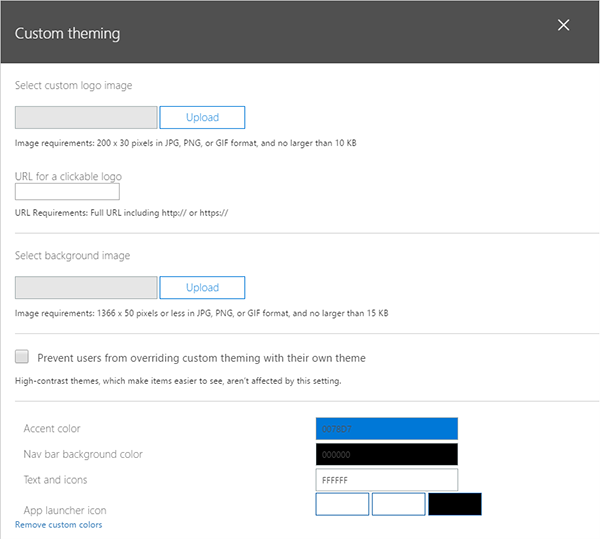
To do so, simply head to ‘Settings’ > ‘Organisation Profile’ > ‘Manage custom themes for your organisation’. Here, you can add your brand’s logo and customise your theme to fit your brand.
Enable Version Control
Sometimes, being able to go through the history of a document can be incredibly helpful and important.
However, if you want to be able to see past versions of work in your organisation, you’ll have to manually enable the feature.
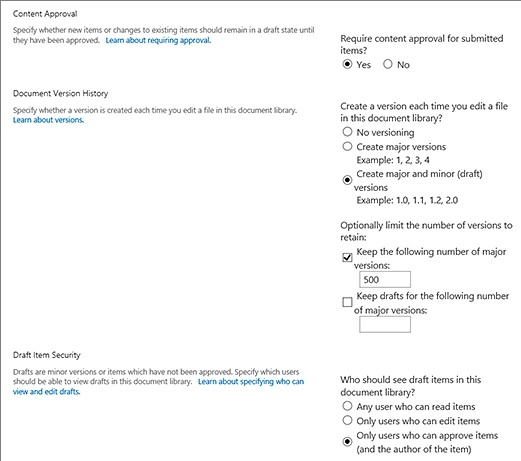
To do so, go to ‘Settings’ > ‘Library Settings’ > ‘Versioning Settings’ and ensure that ‘No Versioning’ is not selected.
There’s a multitude of settings available on the page, such as visibility options and being able to limit the number of versions.
Automate Tasks with Power Automate
Microsoft’s Power Automate is a standout automation tool, being able to create new workflows throughout the Microsoft ecosystem — including Sharepoint.
Automation can increase workflow and productivity significantly, and save a lot of time for your team, having saved over 26,000 hours for companies worldwide last year. Being able to integrate automation into your workflow will have many benefits, and SharePoint allows you to do this with ease.
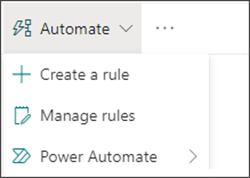
To be able to use Power Automate in Sharepoint to automate tasks and approvals, simply click the Automate menu on your command bar, then click Power Automate. This will give you a number of options. Click Create a Flow to get started.
Set Up Alerts
Alerts are a great way to be able to be notified whenever a document changes within your Sharepoint.
To set up alerts:
- Go to the list or library.
- Select the file, link, or folder you want an alert from.
- Click the … > Alert Me.
- Select OK.
With this, you can ensure you can keep track of all changes and stay in the loop.
Create Logical Naming Conventions
Organisation is key to any business’s success, and this includes naming your files. Rather than having confusing and messy file names, having a naming convention that all of your files use can prevent confusion in your Sharepoint.
While you can’t enforce a naming convention on Sharepoint, ensuring that the naming convention is followed is a great way to save time and stop confusion throughout your organisation.
Set Up Personalised Views
Being able to clearly filter and view information is key for working in any file system. Microsoft SharePoint allows you to easily set up Custom Views to allow you to filter out whatever you don’t need when browsing files.
To set up personalised views:
- Open the view in your browser.
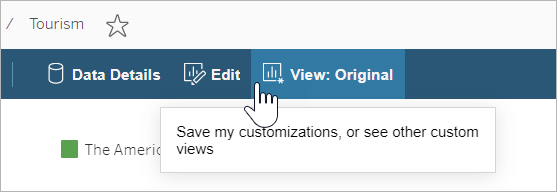
- Click ‘View’ in the toolbar.
- Enter the desired name in the Custom View toolbar.
- Change the settings to your preferred parameters, and click ‘Save’.
Tag Documents
Tags are helpful in any system, to be able to quickly find what you are looking for. By tagging documents effectively, you make finding documents easier and more efficient.
While the tagging feature of SharePoint has been discontinued, you can still tag documents in SharePoint using metadata:
- Navigate to the files you want to tag.
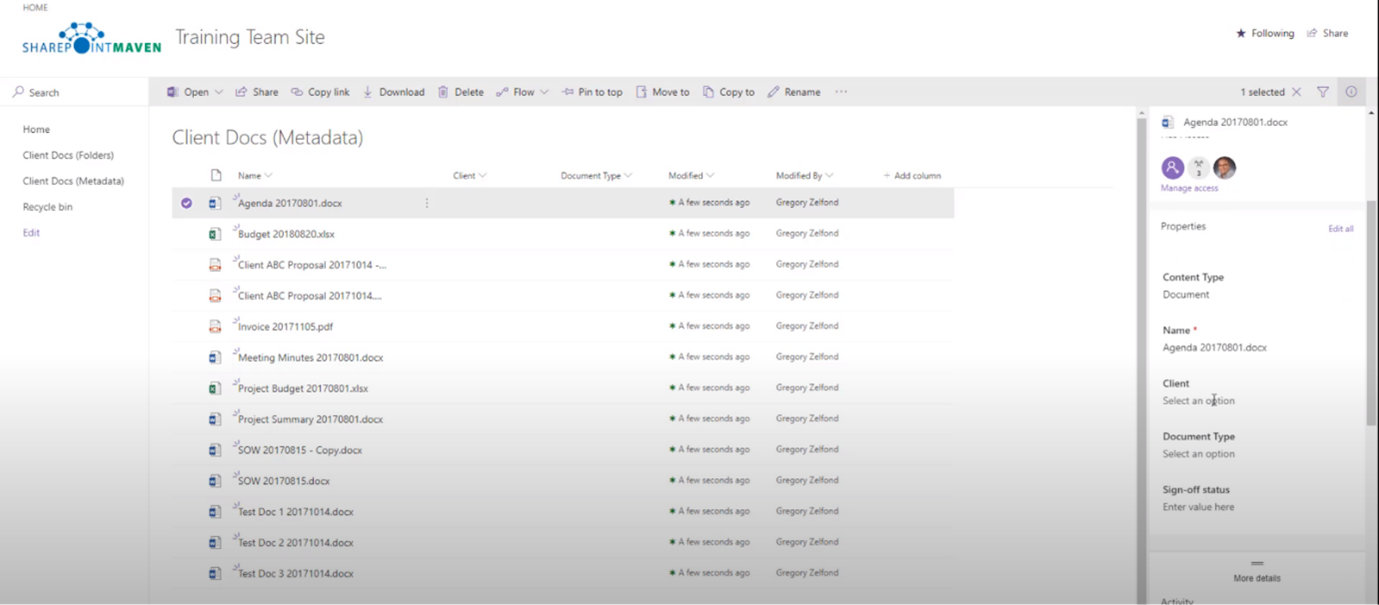
- Select the files you want to tag and open the Information Panel (in the top right).
- Scroll down to the different metadata options. Here you can add metadata such as ‘Client’ and ‘Document Type’, which can be used to organise, search, and filter.
Looking for some extra help?
Microsoft Sharepoint is a powerful collaboration and communication tool that can be used in a multitude of ways. With robust file management, automation, and intranet capabilities, these tips will help you truly unlock the full potential of Sharepoint.
Do you need help getting started with Sharepoint or other Microsoft products? A helping hand can save time and effort and can easily help you find the answers that you need.
Get in touch today and see how we can help you!
Get in touch:
Microsoft Teams - 9 Top Tips
Top 9 Tips to Work Smarter in Microsoft Teams
Companies are rapidly implementing Microsoft Teams to be able to enrich their businesses’ communications structures, and it’s proving successful. Teams is by far the most rapidly growing unified communications solution, and is not looking to stop anytime soon.
With Teams being such a crucial part of the modern workflow, it’s important to make sure that you know exactly how to use it to its maximum potential. After all, failing to do so could waste lots of time, and can just be an inconvenience for you when trying to get important work done.
We believe that everyone should learn how to use Microsoft Teams to its fullest potential. That’s why in this article, we’re going to go over some of the top tips to work smarter in Microsoft Teams in 2022.
Top 9 Tips to Unlock Teams' Full Functionality
Send Urgent Messages
Sometimes, it can be easy to miss messages coming in. Especially when your recipient has a busy inbox, it’s important to mark your message as urgent to make sure that whoever’s on the other end knows that it’s a time-sensitive matter.
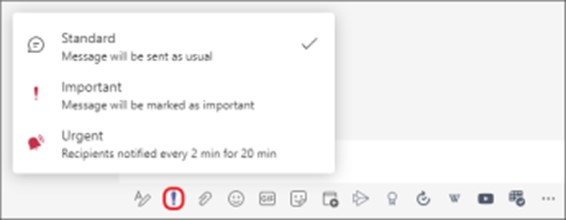
Luckily, doing so in Microsoft Teams is incredibly simple. Press the exclamation mark in the toolbar below the textbox in the chat interface, and select ‘Urgent’. Your message will now be marked as urgent for the recipient. Type in your message and send it, and that’s it!
Use Meeting Reactions
Sometimes you want to show your approval of something in a meeting, but don’t want to interrupt the flow of conversation or presentation. Sometimes, you just want to laugh at a joke without unmuting your microphone.
Meeting reactions make this simple. Just click on the Reaction menu during the meeting and click a reaction, and they’ll pop up on the side for everyone to see.

Create Polls
Asking everybody how they feel about a topic can just take up time and be a mess. Chances are, people will start a discussion in the chat and it’ll make it hard to be able to see the information you need.
Polls are a great way to easily get opinions without hassle. They’re easy to set up, and can be a great way to collect data without having to sift through discussions to work out what people think. To make a Poll — click the ‘Microsoft Forms’ button in the taskbar and fill in the relevant information, and you’re done!

Automate Tasks with Power Automate
Automation is powerful. Rather than having to manually do a list of tasks, automation takes care of it for you. This can save hours of time and effort, and ensure the tasks are all done correctly and uniformly every time.
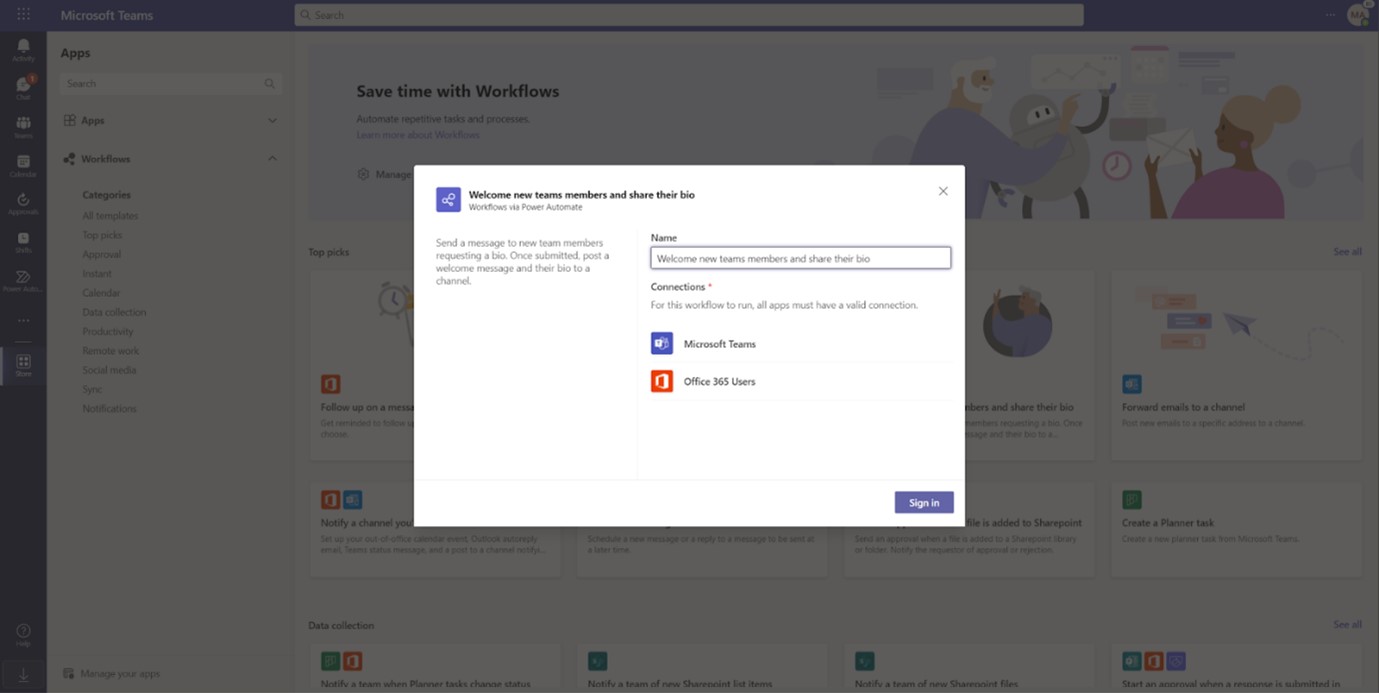
In Microsoft Teams, you can easily set up buttons to do multiple things automatically, without needing to manually input.
- Go into the Store tab on Microsoft Teams.
- Select ‘Workflows’, and select a template to create a workflow.
- Fill in each parameter, and you’re good to go!
Use Live Transcripts
Live transcription is a great way to ensure that hard-of-hearing employees can stay in the conversation. It’s also just a good thing to have, as even a slightly poor connection quality can turn a Teams meeting into robotic gibberish.
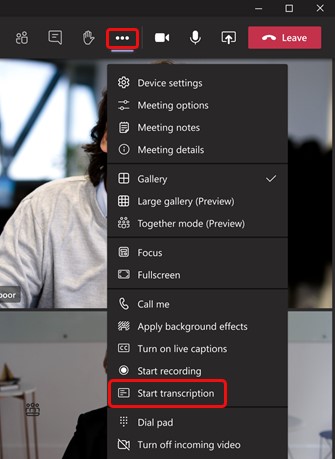
To turn on live transcription, press the three dots on the meeting controls to view ‘More actions’, and click “Start Transcription”.
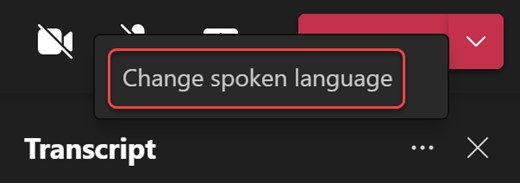
You can also change the transcription language. To do so, click the three dots on the right of the transcript window and click “Change Spoken Language”.
Reorganise your Teams
Sometimes, you want to put a specific team at the top of your teams for ease of access. Or, maybe you just like alphabetical order and want to organise your teams that way. Whatever the reason may be, it’s simple to reorganise your teams.
Just click and hold your cursor on the team that you want to move, and drag it to its new place on the teams list.
Use Loop Components
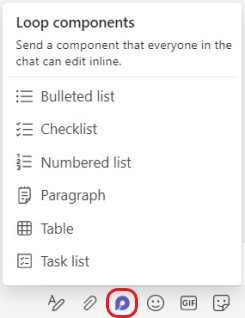
Microsoft’s groundbreaking Loop is the future of collaboration in the workplace. And, you can make use of Loop in Teams — with Loop components. With Loop components, you can collaborate with your team on anything — from agendas, to ideas, to simple checklists.
By sending a Loop Component into a chat, you allow anyone in that chat to be able to work on it collaboratively. To do so, click on the Loop components button in the taskbar. Then, enter whatever you want into the component, and press send.
People will instantly be able to inline edit the component in the chat, and you can even send the same component to multiple chats.
Bookmark Important Conversations
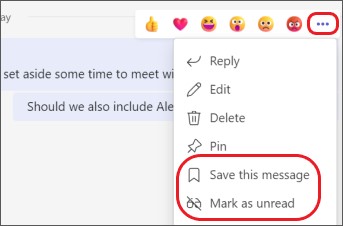
Sometimes, you’ll find that someone in your team says something that’ll be important later. Rather than having to dig back and search for it, it’s much easier to save these messages.
To do so, hover over those messages and click on the three dots next to the reactions, then click “Save this message”. This will save that message to your saved messages, for easy reference. You can also pin messages to the channel here.
Create Teams Templates
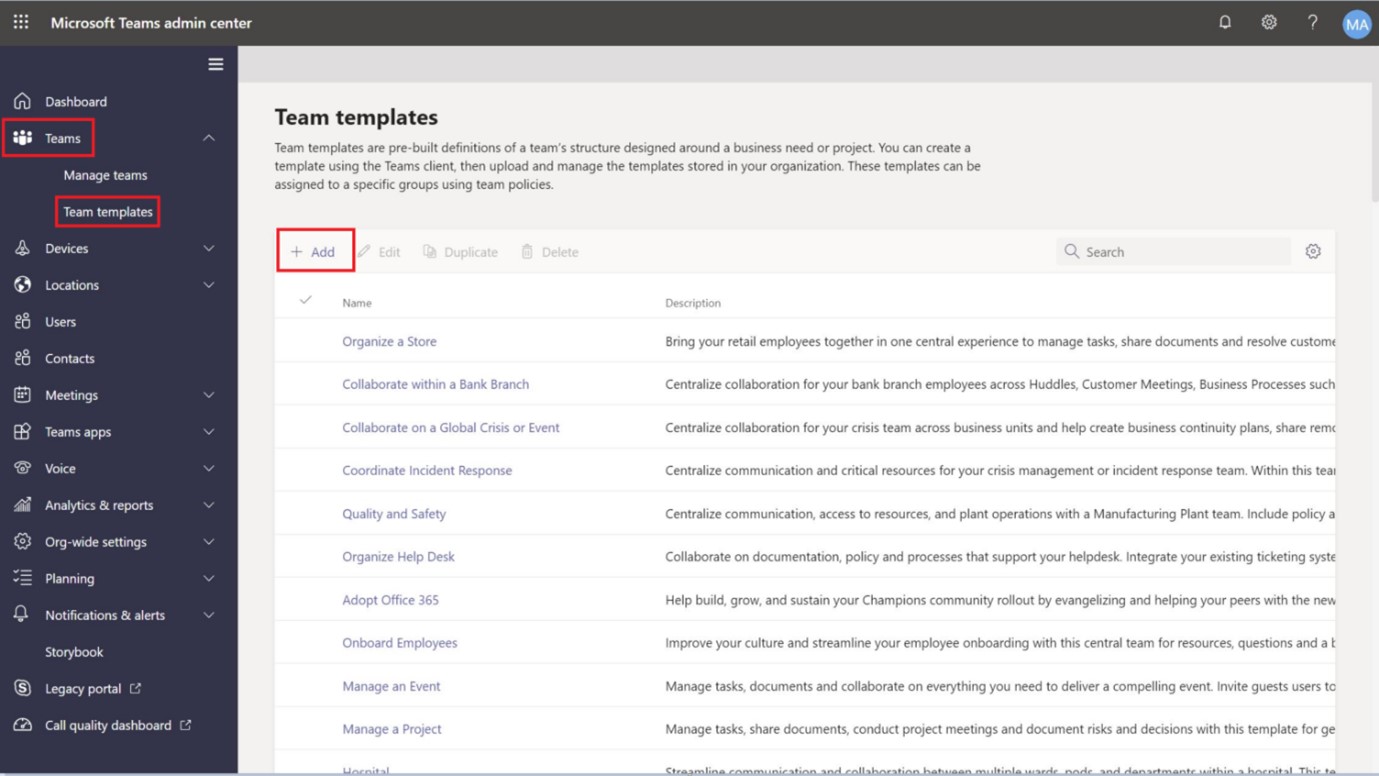
Creating a team from scratch can take a lot of time and effort. Templates are an easy way to circumvent this hassle. You can either create a template for use in all of your teams from scratch or turn a team you already have into a template.
Create a template from scratch
- Go to the Teams menu, and into ‘Team Templates’.
- Click ‘Add.’ and then ‘Create a brand new template.’
- Fill in the template-builder with the template name and description.
- Add any channels you may want to the template.
- Your template is created!
Get Started with Microsoft Teams!
Microsoft Teams is a powerful communications tool that can open up new collaborative workflows for your organisation.
Following these tips & tricks will help unlock Microsoft Teams’ full potential. After all, Teams is rammed with brilliant quality-of-life features that can save you time and help you work better together.
Of course, as Microsoft Teams expands in functionality, its suite of features will only get more in-depth. So, making sure to stay up to date regularly is important. A managed service provider can make sure that all of your 365 applications and tools are up to date, and can ensure that they’re set up properly.
Interested in getting started with Microsoft Teams’ rapidly growing platform? Get in touch today, and see how we can help you!
Get in touch:

Beware of Phishing!

5 Types of Phishing Attacks + How to Avoid Them!
Phishing attacks are a form of social engineering where a cyber criminal imitates a trusted entity and tricks an individual into opening a fraudulent email, SMS, or instant message. This message is designed to deceive the victim into sharing sensitive information or clicking a link that will run malicious code.
In the past year, 83% of all cyber attacks in the UK were phishing attacks. Unfortunately, if these lead to a data breach or ransomware attack, this can be devastating for businesses, and they often result in a loss of customers. The phishing methods that cyber criminals use are becoming more complex, so it is important to understand these methods to be able to spot them before your business falls victim to a cyber attack.
Bulk Phishing:
Bulk phishing is the most common form of phishing attack. This is where a cyber criminal sends a large number of fraudulent emails to employees and individuals. Although they are not tailored to the victim, they can be effective as if enough emails are sent, eventually someone will open one.
Examples of bulk phishing attempts include emails relating to winning a prize, issues with the user’s account, or emails stating that a password has expired and needs to be changed. Some of these can easily be spotted due to poor grammar, spelling and design of the email, however others are nearly indistinguishable from an official email. You should always check where an email has come from and look for different spellings of the email address or URLs in the text. If you are ever in doubt, it is always safer to not open an email.
Spear Phishing:
Spear phishing is an attack where the cyber criminal has researched their target and found personal information to be able to tailor the attack to them. This is typically more successful than bulk phishing as when an email contains personal information it lowers the target’s guard, making them more likely to open a malicious link or file.
These emails may include the victim’s name, or place of work, imitating a supplier or third-party technical support requiring the user to send their password for security purposes. Spear phishing attempts can be difficult to spot, however you should always verify suspicious requests in person if possible and never share your password with others.
Whaling:
Whaling is a form of spear phishing where the attacker targets a company’s executives in order to steal login credentials. This can be devastating for a company, as an executive’s account often has a high-level access to the network along with employee and customer data. Threat actors may also use a spear phishing attack to gain access to an employee’s email account then use their account to phish the executive as they are more likely to trust an email from an employee than an unknown individual.
It is important for an entire company to aware and educated about cybersecurity, especially executives, and there should be policies and software in place to avoid high level employees being phished.
Vishing and Smishing:
Vishing also known as voice phishing are attacks performed over the phone or VoIP. These are often messages imitating a bank or technical support asking for account information for security purposes. These can be detected as fraudulent as a company will never ask for personal information over the phone. Another method of detecting if a call is fraudulent is by checking to make sure the number that has called is listed on the official company website and not a known scam phone number.
Smishing or SMS phishing, is using phone text messaging to mislead or deceive a victim. These can be particularly effective as text messages are more likely to be read and responded to, rather than emails. It is important to apply the same level of scrutiny to phone calls and text messages that you would an email, as it is just as dangerous of an attack vector.
What Can You Do?
Phishing has been a common cyber threat for a long period of time, and it is unlikely to stop anytime soon, especially as cyber criminals are constantly changing their methods to be more complex and difficult to identify. It is important that all employees are aware of phishing methods to avoid being victim to an attack. However, it only takes one employee opening a malicious link or file to have a company-wide data breach. It is in a company’s best interest to have software that uses AI to block phishing attacks before they even land in your inbox.
We offer protection from phishing attacks along with a suite of email protection tools that will ensure that your company’s data stays secure, and you do not lose customers due to a cyber attack.
If you'd like further information on how Stiperstone can support your organisation, please get in touch with us.
Get in touch:

Manufacturing - The Big 6 Losses to Avoid!

The 6 Big Losses in Manufacturing Organisations
In the world of manufacturing, understanding and addressing the Six Big Losses is crucial for optimising productivity and efficiency.
By identifying and mitigating these common causes of equipment-based productivity loss, Stiperstone can help manufacturers significantly enhance their Overall Equipment Effectiveness (OEE) and drive continuous improvement within their operations.
Equipment Failure:
Unplanned downtime due to equipment breakdowns or failures. It includes issues like tooling failures, unplanned maintenance, and other unexpected stoppages.
Setup and Adjustments:
Planned stops for activities such as changeovers, equipment adjustments, and setups. This category also includes time spent on cleaning, warm-up periods, and quality inspections.
Idling and Minor Stops:
These are brief stops, typically lasting a few minutes, that are often resolved by the operator. Common causes include minor jams, misfeeds, and brief pauses in production.
Reduced Speed:
This occurs when equipment operates at speeds lower than its optimal rate. Causes can include worn-out machinery, suboptimal settings, or inefficiencies in the production process.
Process Defects:
These are losses due to producing defective products that require rework or scrapping. This category includes issues like incorrect assembly, poor-quality materials, and operator errors.
Reduced Yield12:
This refers to losses that occur during the start-up phase of production, before the process reaches a stable state. It includes defects and waste produced during this initial period.